
CASE 001Consumer AI · Services marketplace
Pyng: designing discovery for needs people cannot easily name
How a services marketplace combined conversational AI with guided requirement-building to turn fuzzy intent into a shortlist people could understand, refine, and act on.
Read the decision story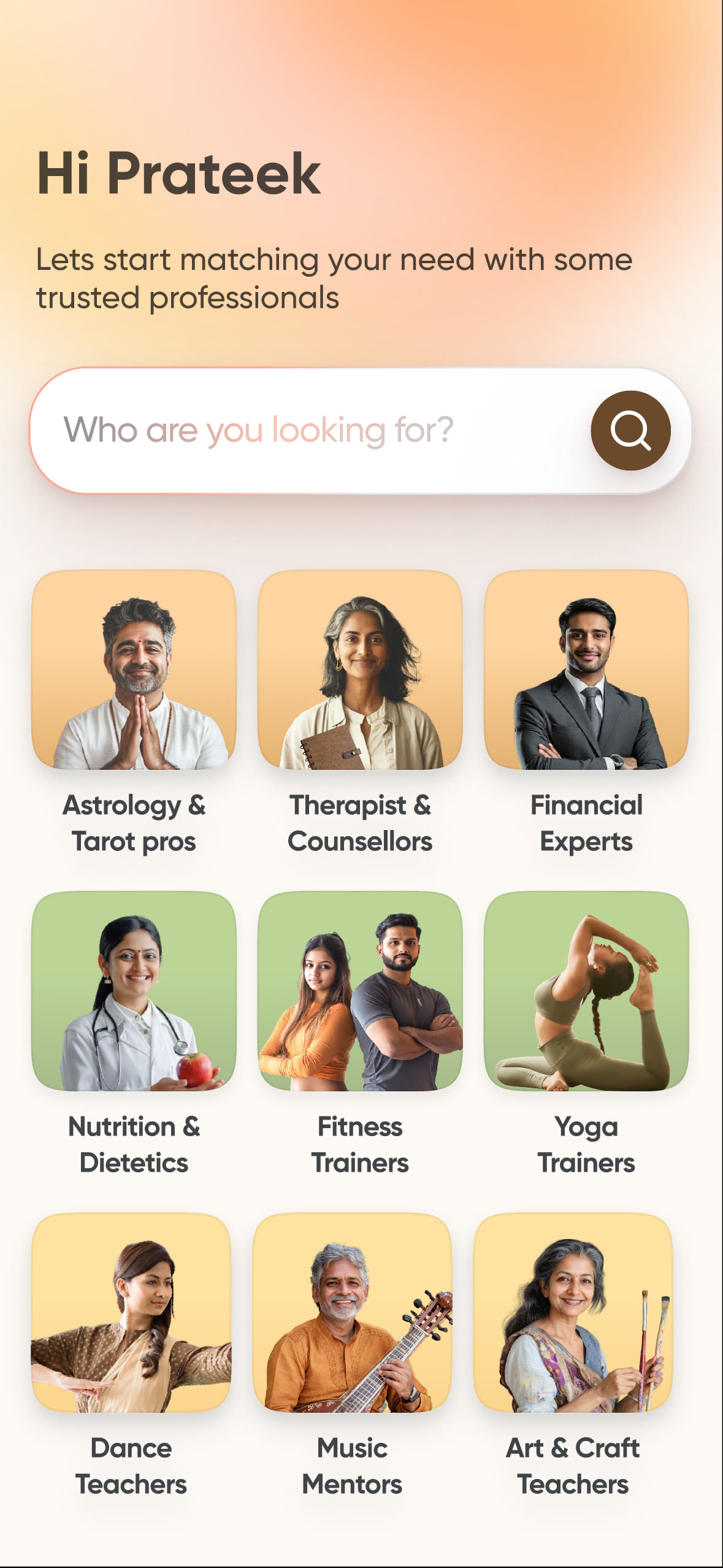
The situation
The user was searching without a shared vocabulary.
Traditional marketplace search assumes that the customer knows what to ask for and that the catalogue has a stable label for it. Professional services break both assumptions. The same need can be described in everyday language, mixed languages, misspellings, outcomes, or life situations.
Even a relevant result is not enough. The user still has to understand why the professional fits, whether they are serviceable, what evidence to trust, and what to ask before committing. On the supply side, vague enquiries create work without enough context to respond well.
The discovery loop therefore had to do four jobs together: interpret intent, collect missing constraints, make the match legible, and move both sides into a useful conversation.
How might we help someone reach the right professional when they can describe their situation, but not the category, criteria, or service they need?
Executive summary
Professional discovery rarely starts with a clean search query. A person may know the outcome they want—file taxes, get fitter, plan a wedding—but not the right professional, vocabulary, or criteria for judging a match.
Pyng treated that uncertainty as a product-system problem. Listings and filters supported low-intent exploration; conversational search interpreted open-ended needs; a guided query builder collected precise requirements when both sides needed more structure.
The important product choice was not simply adding AI to search. It was deciding how the experience should deepen with intent: when browsing was enough, when inference should reduce effort, and when explicit questions should create a decision-ready lead.
Discovery depth
Match the discovery experience to the depth of intent.
Pyng did not force every customer through the same interface. The system deepened as intent became clearer: browse when the need was loose, ask when language could express it, and specify when both sides needed a decision-ready brief.
- 01Listings + filters
- 02Algolia retrieval
- 03LLM conversation
- 04Structured matching
Explore
Basic listings and filters let web-based explorers scan categories, compare visible signals, and learn the marketplace before committing to a precise need.
Best for browsing and category learningAsk
Algolia-powered retrieval provided dependable search coverage while an LLM interpreted natural-language needs, handled ambiguity, and explained why a professional could fit.
Best for open-ended or emerging needsSpecify
The guided query builder captured budget, location, service mode, timing, and goal. Matching logic narrowed the shortlist before sending a structured lead sellers could accept, decline, or discuss when constraints did not match.
Best for decision-ready requestsQuality was defined across both sides.
A useful match had to be relevant enough for the customer to act and specific enough for the seller to respond without another qualification loop. Evaluation separated retrieval coverage, recommendation relevance, constraint satisfaction, and response quality.
- Does retrieval cover the right profession and specialisation?
- Does ranking respect budget, location, service mode, and timing?
- Can the customer understand why each expert fits?
- Can the seller accept, decline, or discuss a mismatch without re-qualifying the lead?
High-intent deep dive · Query builder
See a decision-ready brief take shape.
Each answer adds a real constraint, changes the shortlist, and carries forward into a request the customer can verify—giving sellers enough context to accept, decline, or discuss the match.
- 01Enter
- 02Clarify
- 03Confirm
- 04Respond
The decisions
Four moves that shaped the product.
Treat ambiguity as the input—not an error state
The starting point became the user’s own words. The product could interpret an outcome, location, occasion, or constraint before asking the user to translate their life into marketplace taxonomy.
Use three discovery depths for three levels of intent
Web listings supported low-intent exploration. AI search helped app users express emerging needs in natural language. For high-intent requests, a guided path collected the constraints required to create a useful shortlist and a qualified seller lead.
Separate retrieval from recommendation
Algolia provided dependable structured and keyword retrieval; the LLM interpreted intent and generated query-specific explanations. Keeping those roles distinct protected coverage while allowing the recommendation layer to remove noise and explain fit.
Design the refinement loop, not just the first answer
The user was guided, but never trapped in a questionnaire. They could resume a shortlist, review and edit the assembled requirement before sending it, then see how each responding professional matched—or did not match—before starting a conversation.
Customer side · confirm the brief
Let customers verify the lead before it reaches a seller.
The query builder’s output remains visible and editable. Customers can confirm the assembled constraints before sending, then compare every response against the same shared brief.
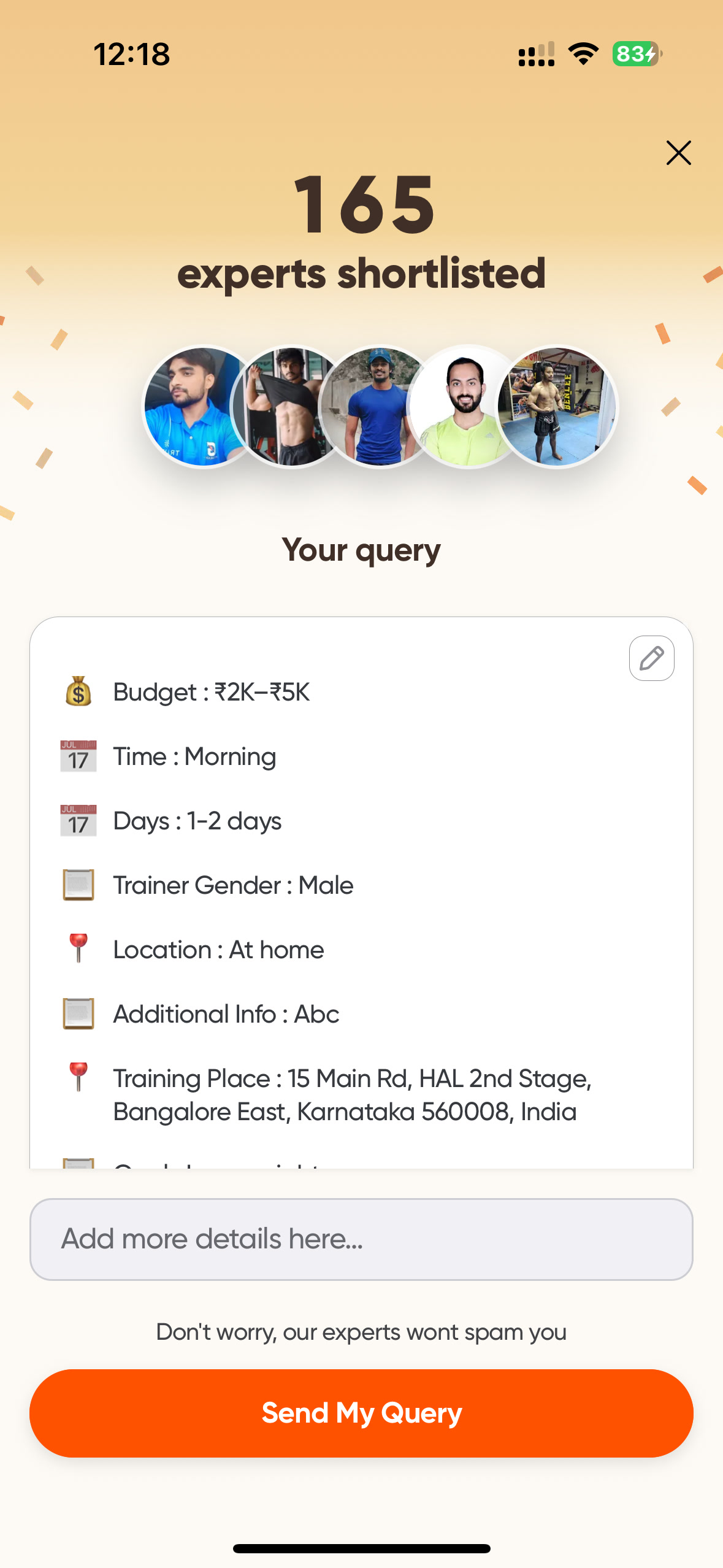
03 · Confirm Review the assembled query
Before sending, the customer can verify the structured brief, edit details, and add context in their own words.
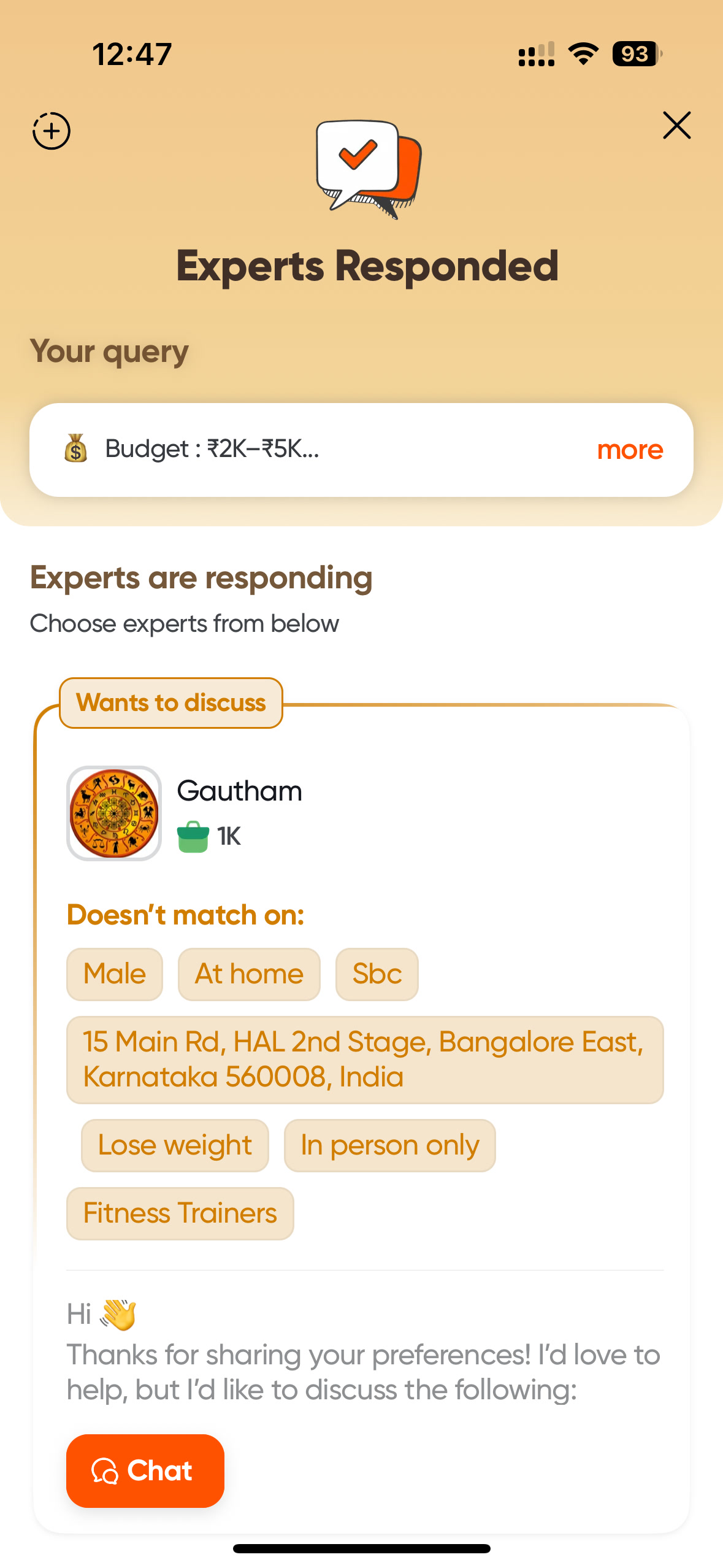
04 · Respond Compare responses against one brief
Returned responses remain anchored to the original query and distinguish exact fits from experts who want to discuss a mismatch.
Seller side · evaluate and respond
Give experts enough context to answer honestly.
The same structured brief becomes the seller workflow. Experts can inspect the need, check whether they satisfy every constraint, then accept, decline, or discuss a mismatch without making the customer repeat themselves.

01 · Receive Surface a time-bound matched lead
The expert receives a new-match notification that leads directly into a structured opportunity rather than an unqualified cold message.
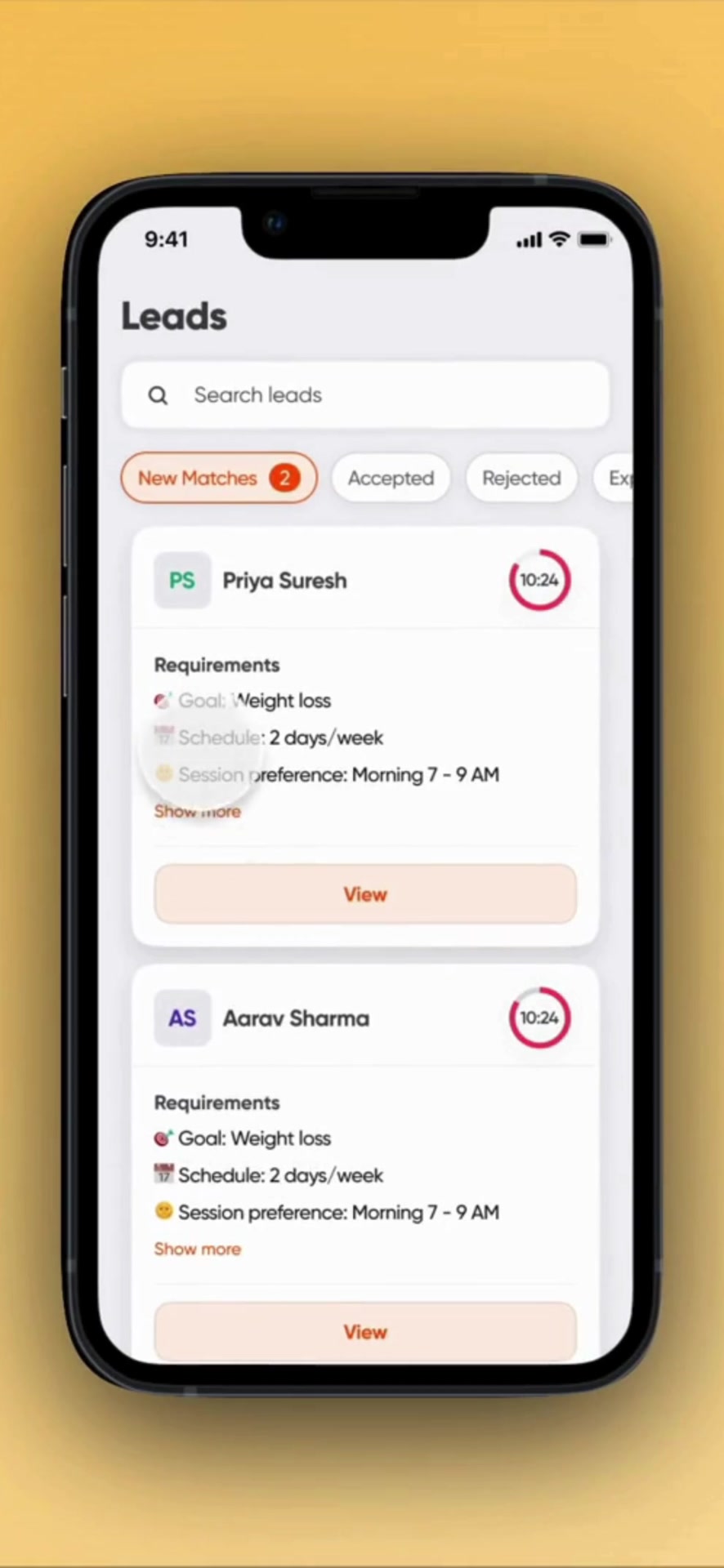
02 · Inspect Preserve the customer’s answers
The lead overview keeps the customer’s goal, cadence, and preferred time visible before the expert decides how to respond.
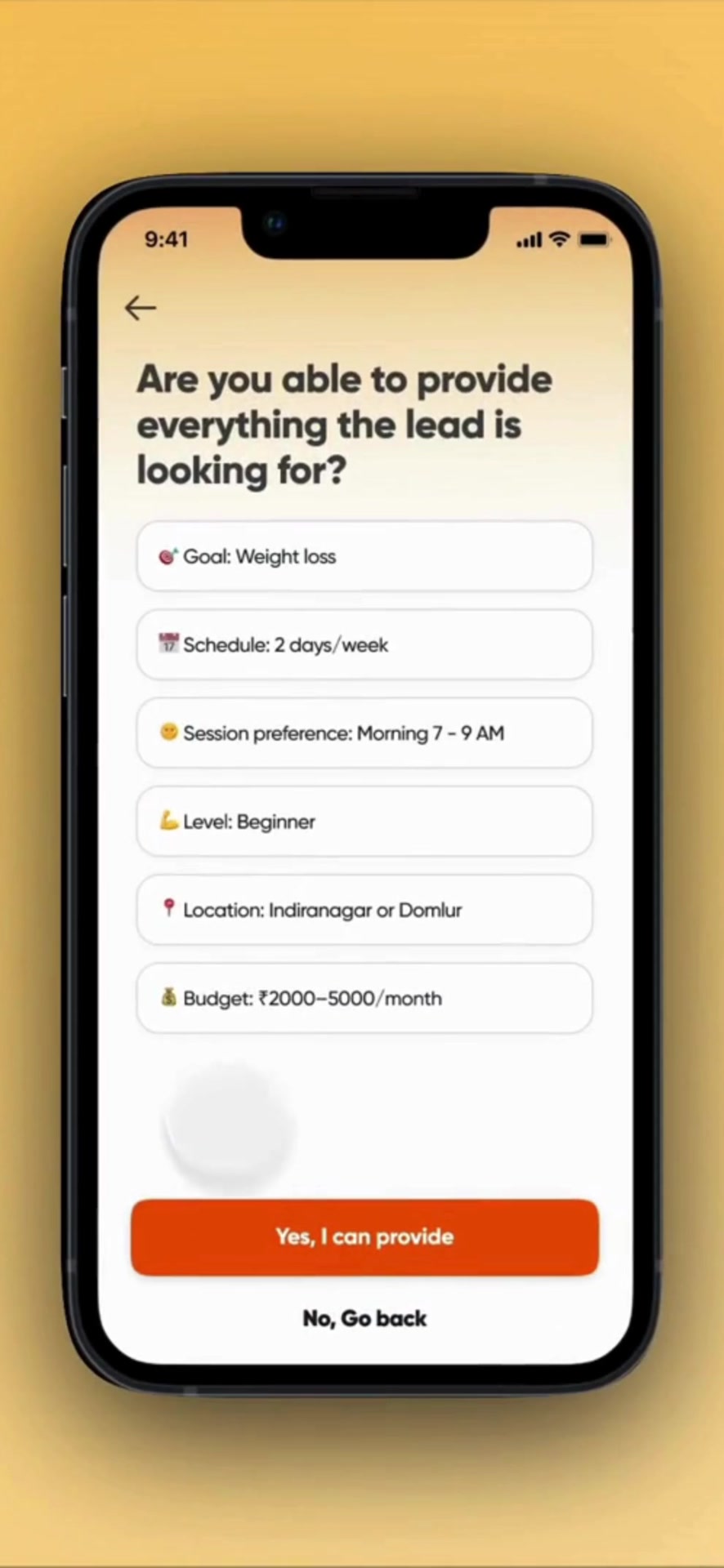
03 · Check Test fit across every constraint
Goal, cadence, timing, experience level, location, and budget are checked together so category fit alone is not mistaken for serviceability.
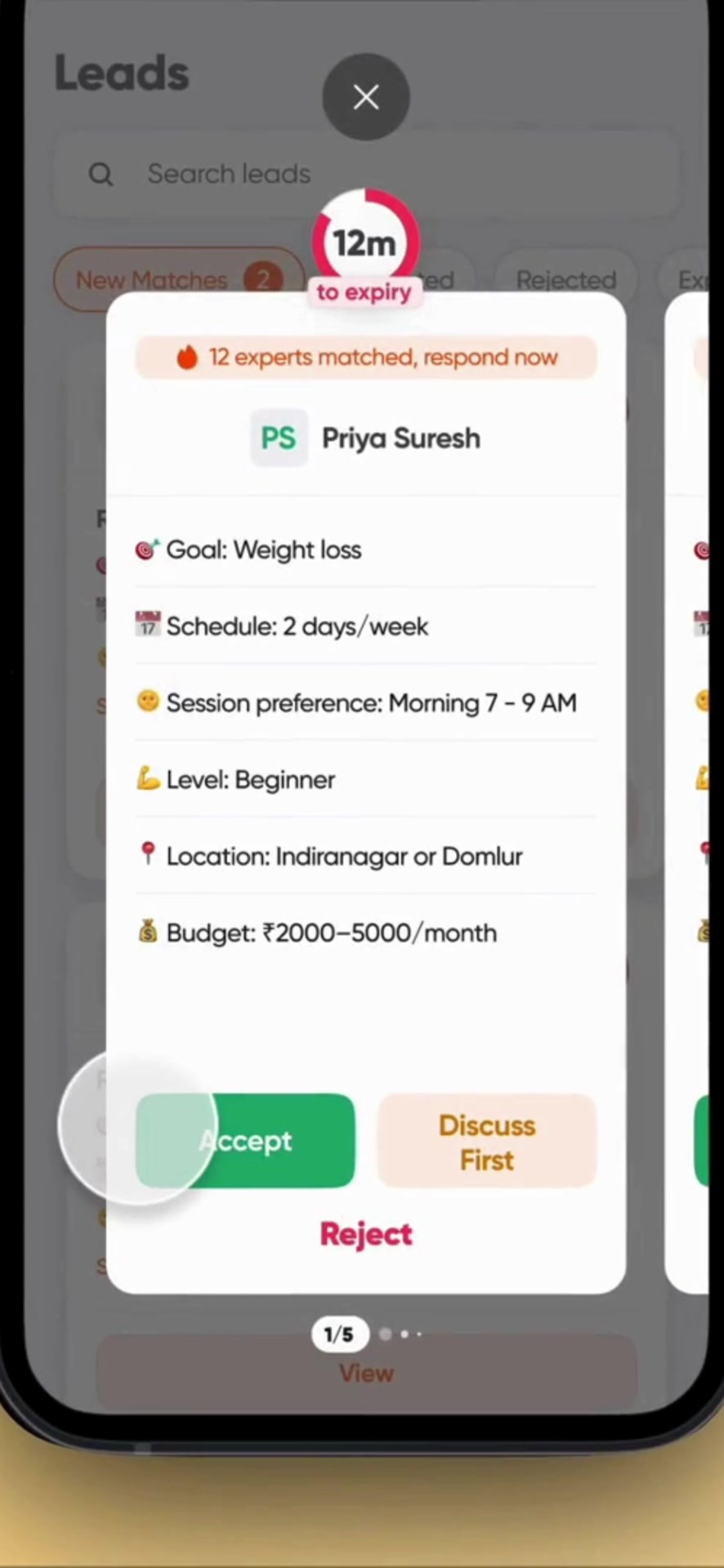
04 · Decide Accept, discuss, or reject
The seller can accept only when the brief is supportable, discuss a partial fit, or reject—keeping imperfect matches transparent.
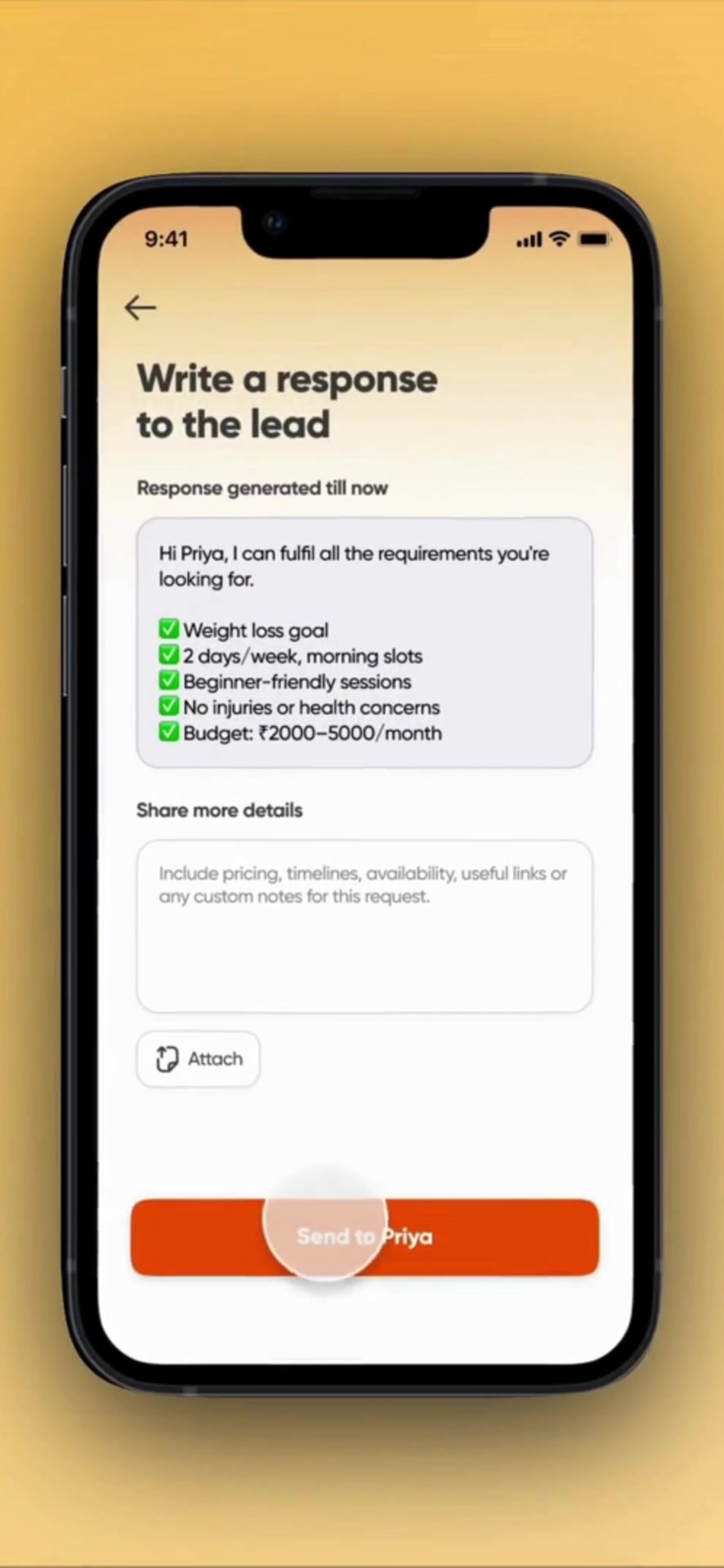
05 · Respond Reply with the brief attached
A generated summary carries the matched requirements forward while leaving room for the expert to add relevant experience and details.
Product artifacts
What to notice in the interface.
These are selected public-facing screens. Captions focus on the product choice—not confidential performance data.
Natural language and familiar categories share the starting surface, so the user can begin with either a situation or a known profession.
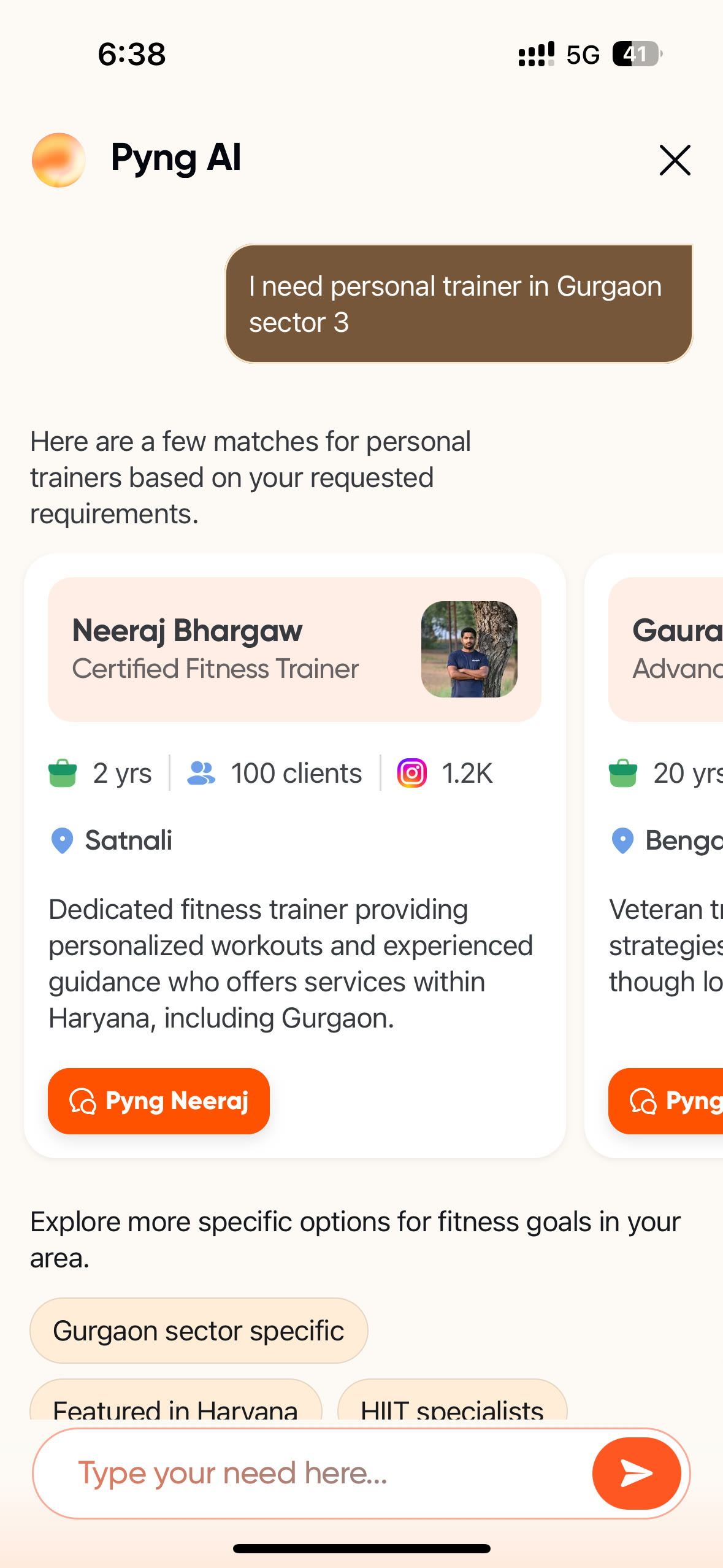
The original request stays visible beside the shortlist, while query-specific match reasons and refinement options make the interpretation inspectable.
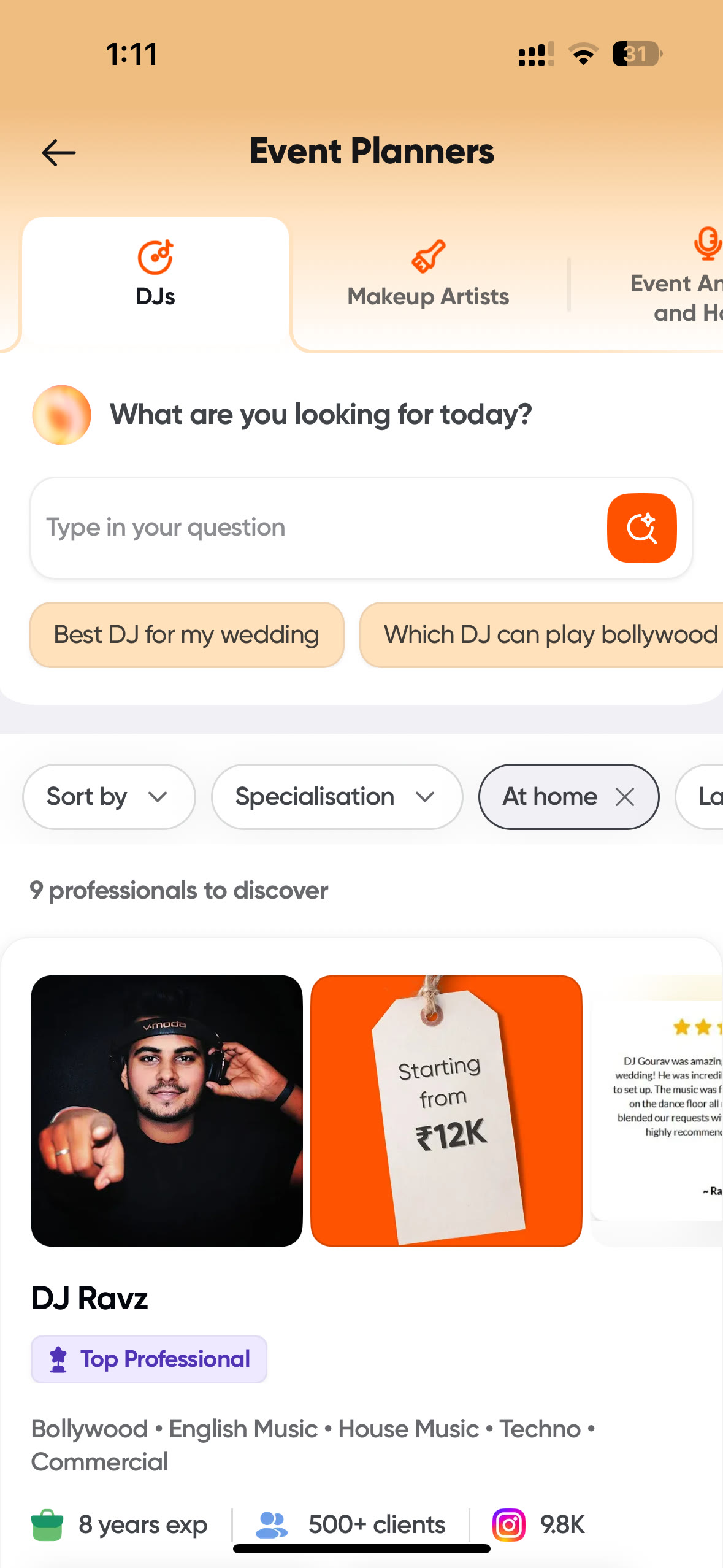
Conventional categories, sorting, and service filters remain available alongside AI assistance; no single discovery mode has to do every job.
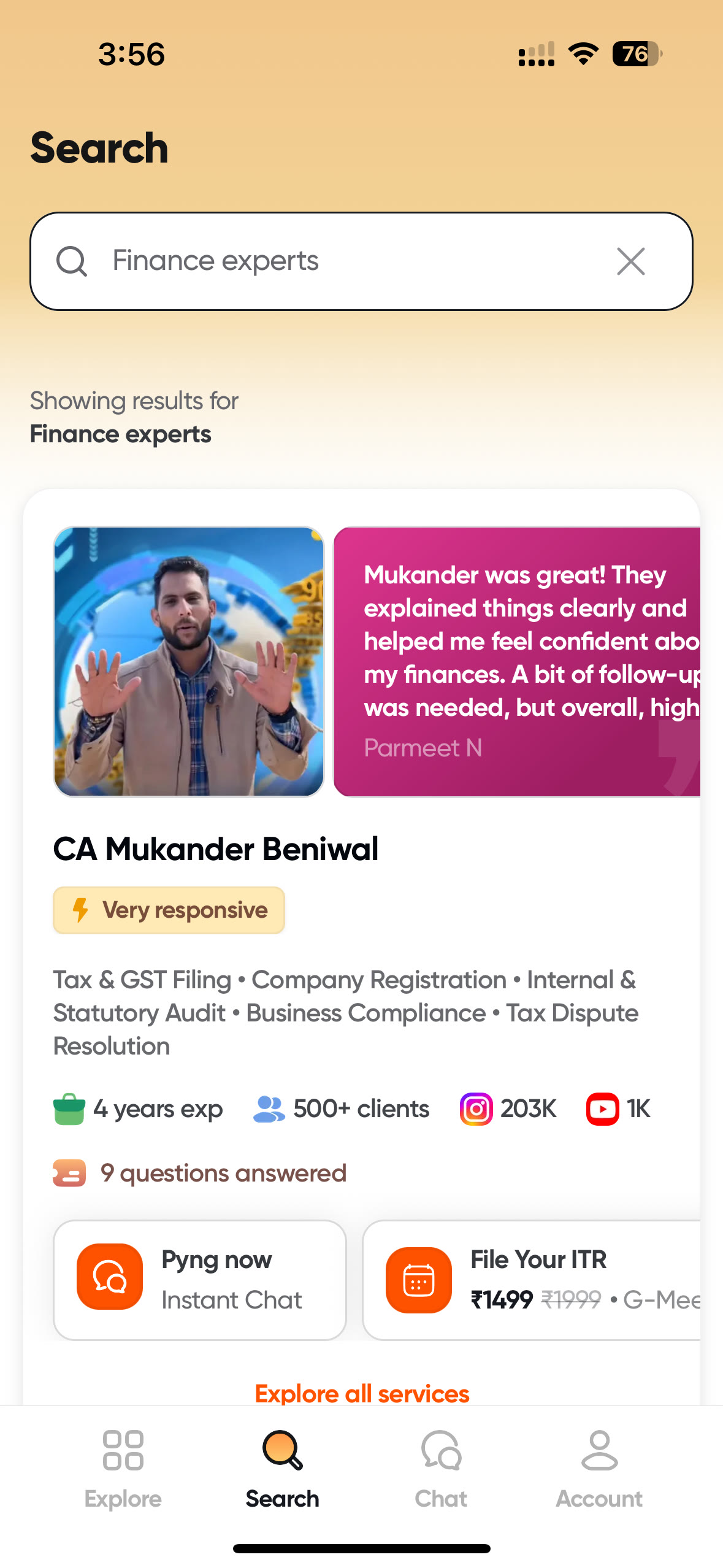
Profiles bring specialisation, evidence, service formats, and direct actions together at the point where the user tests fit.
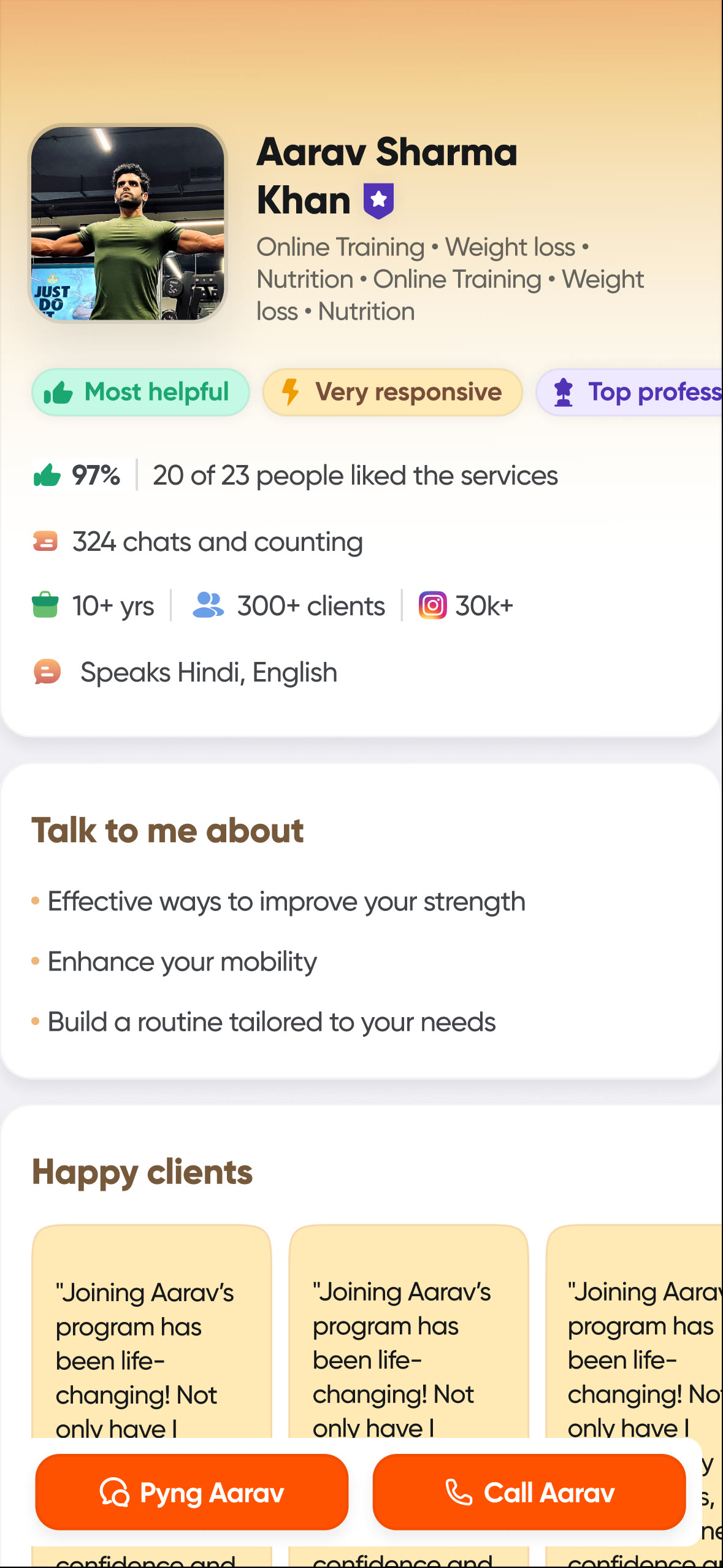
The full profile is the customer’s final evaluation surface: specialisation, trust markers, experience, languages, client proof, and contact options stay together.
Outcome · public-safe
The launch turned an uncertain search into a navigable journey.
Swiggy publicly launched Pyng in April 2025 as an AI-powered platform for connecting people with verified professionals. The announcement described AI search assistance, professional profiles, and real-time support across a wide range of specialisations.
The shipped experience joined intent interpretation, guided requirement capture, explainable recommendations, profile evidence, and direct contact. It gave different kinds of uncertainty different interaction patterns instead of forcing every need through one search box.
This public case does not use internal performance figures. The evidence shown here is the product itself: a consumer journey that makes a trust-heavy, poorly specified search easier to understand and act on.
Natural language becomes structured, editable intent
Guided answers become an editable requirement before submission
Recommendations explain their fit instead of only ranking results
Responses preserve context and make imperfect matches discussable
Reflection
What travelled with me.
Inference and control are complements
AI is valuable when it removes vocabulary and taxonomy work. Explicit controls are valuable when the user needs precision. Strong discovery systems know when to switch between them.
Evaluation starts with product policy
Before measuring model quality, the product needs rules for what counts as relevant, how location and profession mismatches are handled, and when the right answer is to admit that no exact match exists.
The answer is a loop, not a list
The first shortlist is provisional. Progress feedback, an editable query summary, transparent responses, profile evidence, and conversation make the match improve over time—and create value before any booking happens.
Evidence boundary
Useful detail without internal detail.
This case study uses public product screens, published company context, and qualitative product reasoning. It intentionally omits internal metrics, commercial data, roadmaps, and confidential operating details.